
01Two jobs that share one name
When a planner searches for turnaround scheduling software, they usually need two different things. The first is a scheduler: a tool that holds activities, durations, logic and resources and calculates the critical path. The second is a planning system: the place where scope becomes work packages, where material is tied to the work that needs it, and where cost is estimated before a contractor mobilizes.
Primavera P6 is the scheduler on most turnarounds. It is good at that job and it should keep it. The problem is that the second job rarely has a system at all. It lives in spreadsheets, shared drives, email and the contractor's own tools, and it is rebuilt from scratch every event.
02What a scheduler does well
A scheduler answers one question: given these activities, these durations and this logic, when does each activity happen, and which ones control the end date? It does five things no planning system should try to take over.
Holds the activity list, durations and logic ties.
Calculates the critical path and float.
Levels resources across crews and shifts.
Runs what-if scenarios when scope or durations change.
Reports schedule progress by shift during execution.
What a scheduler does not hold is the content of the work. An activity called "Replace bundle E-301" is a bar with a duration. The scheduler does not know whether the bundle is on site, whether the work package has been reviewed, what the contractor quoted for the job, or what has been spent against it. Those answers live somewhere else, and on most turnarounds that somewhere is a spreadsheet.
03What planning is
Planning is everything that makes an activity executable. In order:
Scope definition and the scope freeze: what is in, what is out, and what it takes to add work after the freeze.
Work development: a work package per job, with the steps, the crew, the isolation and permits it depends on, and the drawings it needs.
Estimating: hours, crew size and cost per package, in one format across contractors.
Material: a requisition per package, a purchase order per requisition, and readiness tracked against the date the work needs it.
Contractor estimates and bids, compared line by line before award.
Readiness reviews at each gate, with readiness calculated from the packages rather than asserted in a meeting.
Field execution: progress, QA and discovery work captured where the work happens.
Closeout: the package closed within hours of the work, and the lessons captured for the next cycle.
The schedule is an output of planning. It is the sequencing of work that planning defined. When planning lives in spreadsheets, the schedule is sequencing work nobody can see.
04Where the handoff breaks
| Failure | What it looks like | What it costs |
|---|---|---|
| Work packages in spreadsheets | Twenty versions, one of them current, none tied to the activity | Crews arrive to a package that changed last week |
| Material not tied to activities | Shortages found the morning the crew is on the job | Idle crews, emergency orders, schedule changes |
| Progress collected by phone | The scheduler updates from memory at the end of the shift | Closed jobs sit unreported; one site averaged over 72 hours to close out a job |
| Work steps retyped into P6 | The scheduler rebuilds every activity by hand from the package | Hours of double entry; activities that drift from the package |
| Discovery scope outside both systems | Work added after the freeze is visible when the invoice arrives | Scope growth with no approval and no forecast |
| Cost in neither system | The forecast is assembled monthly from contractor reports | Decisions made on numbers three weeks old |
| Contractors on their own tools | Estimates and progress arrive in each contractor's format | The knowledge leaves the site at demobilization |
05A clean division of labor
| Item | Lives in the scheduler | Lives in the planning system |
|---|---|---|
| Activities, durations, logic | Sequenced here | Written here, as work steps |
| Critical path and float | Yes | No |
| Resource curves | Yes | No |
| Scope list and freeze | No | Yes |
| Work packages | No | Yes |
| Material readiness per package | No | Yes |
| Contractor estimates and bids | No | Yes |
| Daily cost and forecast | No | Yes |
| Field progress | Updated here | Captured here |
| Readiness percentage | No | Yes, calculated from the packages |
06How the two should connect
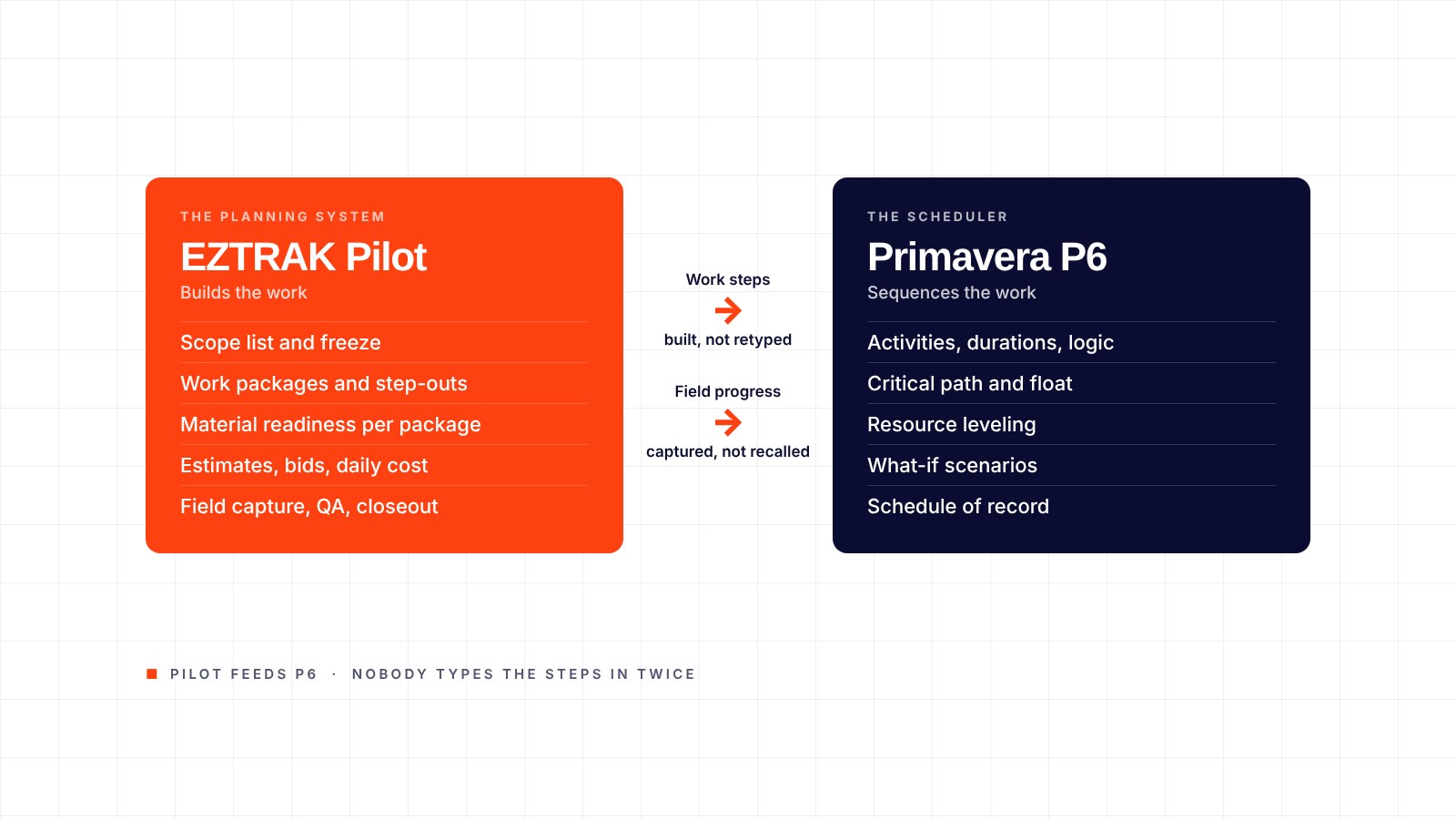
Two things cross the line, and both travel the same direction: from the planning system to the scheduler. The work steps go first. The planner builds each package from the step-out library, and the steps, durations, crew and sequence go to P6 as the activities. Nobody retypes them: the scheduler is not rebuilding activities by hand from the planner's documents, and the planner is not writing them out twice. Field progress follows the same path, so the scheduler updates from what was captured in the field, not from what was recalled at the end of the shift.
EZTRAK Pilot feeds Primavera P6: the work steps from each package go to P6 as activities, and field progress follows. P6 stays the schedule of record. Nothing about the scheduler's job changes, except that the activities arrive built, and every one of them points at a package, material and cost that exist in a system.
07What to ask a vendor
Does your product try to replace the scheduler, or work beside it? A product that wants to own the schedule will fight the scheduling team.
Can the work steps in a package go to P6 as activities without anyone retyping them, and does material readiness measure against the activity date?
Where is field progress captured, and who types it in?
Do contractors work inside the system, or send files in?
When scope is added after the freeze, where does it show, and on what day?
How long until a working system exists, and is the first term month to month?
08A worked example: one exchanger bundle
Take E-301, a bundle replacement on the scope list. In the planning system it is a work package with 14 steps, a four-person crew, two permits, an isolation list and three drawings. Those steps go to P6 as the activity, 36 hours, tied to the unit's cool-down and to the crane; the scheduler sequences them, he does not type them. The bundle is a long-lead item with a 32-week lead time; the package carries the requisition, the purchase order, the promised date and the activity date the schedule needs it.
Six weeks out, the supplier slips the bundle by nine days. In the planning system that is a shortage against the activity date, visible the day the supplier says so, with the package and the contractor it affects. The scheduler moves the activity, and the crane sequence moves with it. During execution the crew records each step on a phone; when the last step closes, QA is notified at once and the package is closed the same shift. The scheduler updates from that record rather than from a radio call. At closeout the package, its material history and its cost go into the archive the next turnaround starts from.
09Where EZTRAK fits
EZTRAK Pilot is turnaround planning and management software: scope, work packages, estimating, material readiness, field execution and closeout in one system, with contractors working inside it. Flow carries the material from requisition to installation, and Vault carries the cost from the first estimate to the final forecast. A working system is live in one to two weeks and full rollout takes four to six.
At PBF Torrance, EZTRAK supported a documented 40% reduction in contract-planner spend, and the 2024 turnaround finished three shifts ahead of schedule.
10Frequently asked questions
Does EZTRAK replace Primavera P6?
No. P6 stays the schedule of record. EZTRAK holds the work packages, material and cost around each activity and feeds P6 the work steps and field progress.
Do we need P6 to use Pilot?
No. Pilot's milestones, packages and readiness run on their own. A P6 link sends each package's work steps and progress to P6 so nobody enters them twice.
Who updates the schedule?
The scheduler does, as now. The difference is that the progress they update from was captured in the field, not collected by phone.
How long does setup take?
A working system in one to two weeks, full rollout in four to six, with users trained in under an hour.
See Pilot beside P6, on a live system.
Fifteen minutes: work steps and field progress out to P6, and the packages, material and cost behind them. Or call 626-327-6348.